When running a CSS shopping campaign alongside your in-house or Agency campaign there will often come a question, … “Is this extra activity truly incremental or are all the sales through the CSS campaign revenue that we would have picked up anyway?” This question is increasingly common in times of financial instability, limited growth and during the cost of living crisis impacting all of us. As most marketers operate with limited budgets, everyone wants to try their best to ensure that each investment with media partners delivers incrementality, not just ROAS. This article aims to explain how to run incrementality testing for CSS shopping partners.
What are we trying to measure?
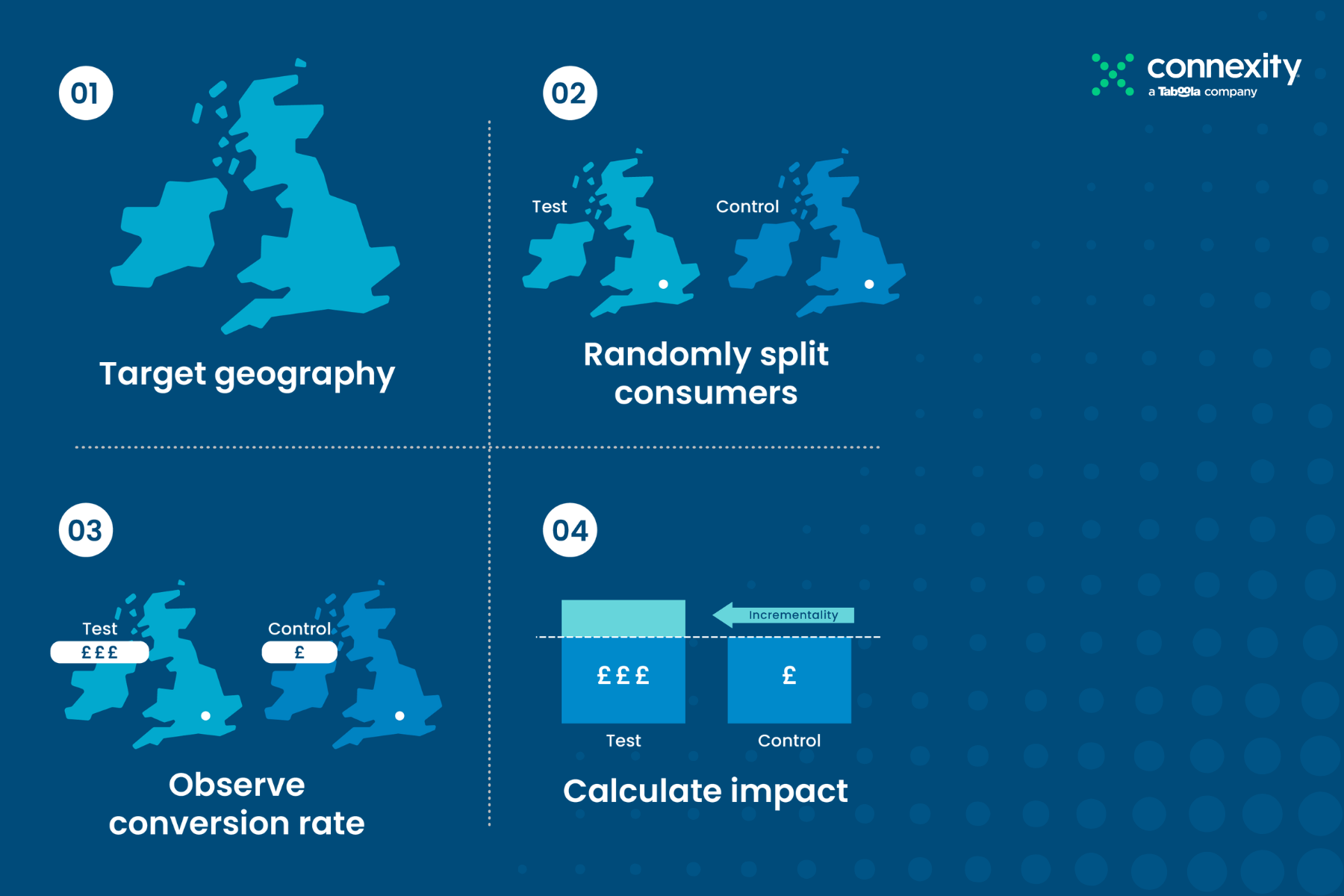
What marketers, CMOs and CFOs want to see proven is that a given sale would not have occurred if the marketing activity weren’t running. So, the best way to prove it out is to design an A/B holdout experiment that measures the uplift of the test group (A) where the activity is running versus a control group (B) where the campaign is not active.
Connexity has run many of these experiments over the last years and they have been consistently structured and run in the same way. Here’s a broad description of the best practice, setup processes and how to measure the lift.
Thinking about when to test
In Google Shopping it makes sense to have a stable campaign that is running at the target that you expect to be at before running any testing. Google needs time to understand which products are selling and which user profiles are buying, so having a stable campaign baseline is very important.
Secondly, running an incrementality test during a high-impact marketing campaign probably doesn’t make sense. For example, running an incrementality test over Black Friday probably will contain a lot of other factors or noise impacting the results, which would affect the validity or statistical relevance of the test.
In our experience, advertisers tend to run these tests in lower periods of marketing activity for example January or February or in the summer when many people are on vacation.
So once you’ve selected your campaign testing period, you need to work out your test and control regions. Splitting the geography equally is the goal. You’ll want to split your target geography, e.g., the UK market, into two segments using historical revenue data and aim to split it as close to 50:50 as possible. If you assign groups or regions randomly, you might put your best-performing regions up against your worst-performing regions, which would skew results and invalidate the entire test.
Once your split is agreed upon, the regions can be set up directly in Google Ads using the geotargeting functionality. Once set, we recommend reviewing it for a week or two to make sure the revenue looks about 50:50 in each group before turning off the control group.
In terms of the test period itself, it really depends on the volume of conversions that you have. Advertisers who normally run incrementality tests will be having hundreds, if not thousands, of conversions each month. Typically, we aim for around 500 conversions per group as a minimum to give significant results.
For the largest advertisers the test could run for 2-4 weeks; for smaller advertisers with less conversion volume, it might take up to 8 weeks.
How do you measure the data?
Once the test is finished, you want to let the data cool off for at least a week or two.
You want to make sure that your attribution model and tracking capture every single sale that’s relevant from the test, especially if you are using a click-based attribution model and have latent conversions that will land days after the test has finished.
Once all sales from the test group are captured, it’s worth reviewing all of the data to remove any anomalies such as business-to-business purchases. For example, if you sell laptops and someone bought 50 for £1000 each, in either the test or control group, this is not usual purchase behaviour and so this £50k order should be removed as part of the measurement protocol.
With clean data you can then look to measure the uplift, which effectively is the incremental revenue in the test group divided by the costs of the campaign. Assuming the incremental lift is significant enough and meets your expectation, then you know the campaign is adding value and conversions that you would not have got anyway.
If you’d like to understand how to run an incrementality test for your CSS activity, please contact us. We would be happy to give you our feedback and recommendations.